Type a question about the image you have open, such as “What percent of nuclei are Ki67-positive in this region?” An AI assistant plans the steps, and SlideScope runs its own counting, IHC scoring and measuring tools on your computer. Every number in the answer comes from one of those tools, with the evidence to check it and a button that re-runs the steps without AI. Research use only.
Every number from a local toolNo images mode: the image stays on your computerEvidence, re-run and export
How Ask Your Slide works
Open the image in SlideScope on Windows or macOS: a whole slide, a confocal stack, a fluorescence image or any of the formats SlideScope opens.
Ask in plain language. Draw a region or zoom to the field first if the question is about one area. Answers come back in any of 14 languages.
The AI plans; local tools do the work. The assistant picks the steps (count nuclei, score DAB, measure a region, find hotspots), and SlideScope runs each one on your computer. You watch every action on the image, and each one can be undone.
Read the answer with its evidence. The answer cites the exact views it used as [R1], [R2] and so on: click one to jump back to that view. Evidence lists every step with its area in pixels, plane, parameters and results, and the answer shows what was sent.
Check, re-run and export. Re-run without AI recomputes the same steps locally and checks that the numbers are identical. Export the answer, the analysis record and a Methods paragraph, or make a figure with a scale bar.
Questions you can ask, and the tools that answer them
Ask Your Slide works with SlideScope's own tools: counting nuclei, cells or particles (InstanSeg deep-learning segmentation or a classical method), IHC scoring for DAB, region statistics, calibrated measurements, channel saturation statistics, a hotspot finder, region outlines, notes and view controls. A few examples:
You ask
Tools SlideScope runs
What you get
“What percent of nuclei are Ki67-positive in this region?”
Count nuclei (InstanSeg), then IHC scoring for DAB
Percent positive with the number of nuclei counted, and outlines on the image
“Give me the H-score and Allred score for the area I outlined.”
Count nuclei, IHC scoring with QuPath-compatible definitions
H-score, Allred score and percent positive for that region
“Find the three most crowded areas and score Ki67 in each.”
Hotspot finder, outline regions, count and score per region
Three outlined hotspots with density per mm², a z-score and a Ki67 percent for each
“How many cells are in this field, and how big are they?”
Count cells (InstanSeg or classical)
A count and object areas, exportable as CSV and GeoJSON
“Compare DAPI density in these two regions.”
Region statistics and nuclei counts for each region
Area, count and density per mm² side by side
“Which channel is brightest here, and is anything saturated?”
Region statistics, channel saturation statistics
Mean intensity per channel and the saturated fraction of each
“Take me to the brightest GFP area.”
Hotspot finder on the GFP channel, then move the view
The view zoomed to that area, with the region outlined
“What is the area of this region in µm², and how much of it is DAB-positive?”
Calibrated measurement, region statistics
Area in µm² and the DAB-positive area percent
“Go to Z-plane 12 and count the nuclei.”
Move the view (Z), count nuclei
The count on that plane, with the plane recorded in the evidence
“Add a note with these numbers.”
Add a note
A note on the slide that stays with the image
Questions across a whole experiment, such as group comparisons and statistics over many images, are coming later to Plus. Today Ask Your Slide answers about the image that is open.
Every number comes from a tool
General AI models were not built to count objects by looking at a picture (Haase, ChatGPT for Image Analysis, 2024), so Ask Your Slide never lets the model estimate a number. The assistant only decides which tools to run; every count, score, area and intensity in the answer is computed by SlideScope on your computer, and you can check each one:
Citations to views. Each statement points to the view it came from ([R1], [R2]). Click it and SlideScope returns to that exact position, zoom and plane.
Evidence. Every step, with the area analysed in pixels, the plane, the parameters used and the results.
Re-run without AI. Recomputes the recorded steps locally, with no AI involved, and checks that the numbers come out identical.
What was sent. The answer shows exactly what left your computer for that question.
Visible and undoable. Outlines, notes and view changes appear on the image as they happen, and each one can be undone.
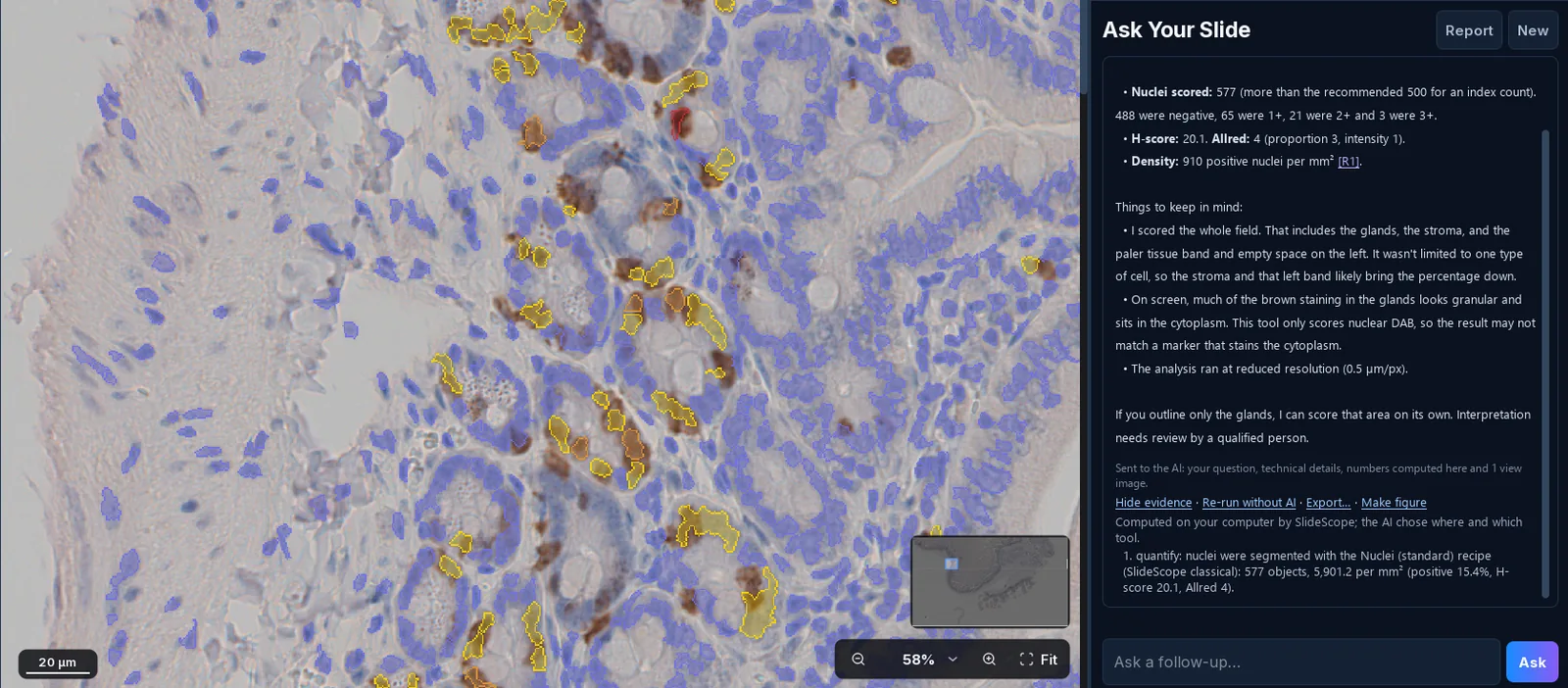
A real Ask Your Slide answer in SlideScope 1.23 to “What % of nuclei are DAB-positive here?” (15.4%) on a BrdU IHC section of mouse duodenum (EPFL, CC BY 4.0). Nuclei are outlined by their DAB grade, the answer cites the view it used as [R1], and the evidence shows the local step that produced every number, with Re-run without AI, Export and Make figure.
Private by design: what is sent, exactly
The analysis runs on your computer. Planning the steps and writing the answer is done by a cloud AI model, and a switch in the Ask Your Slide panel, Send view images, decides whether it ever sees a picture.
Send view images
What is sent to the cloud AI
What never leaves your computer
Off (“No images”)
Your question, limited technical details (format, dimensions, channels, pixel size) and the numbers the local tools computed
The image and the file
On
The same, plus the views the AI looks at, each shown on your screen first, compressed
The file and every part of the image the AI does not look at
Your questions and images are not used to train AI models. Medical scans such as CT and MRI are refused. The AI provider and the full terms are in the privacy notice, and the data handling page explains what the rest of SlideScope keeps on your computer.
Exports for your notebook, figure and Methods
answer.md: the answer with its citations, ready to paste into a lab notebook.
analysis_record.json: the full record of steps, parameters and results, the same record Re-run without AI uses.
Methods text: a paragraph describing what was measured and how, to adapt for a manuscript.
Quantify outputs: the object table as CSV, outlines as GeoJSON (they open in QuPath), masks and an annotated image.
Make figure: a figure of the view with a calibrated scale bar.
Reporting checklists from the QUAREP-LiMi community ask authors to report image-analysis workflows and figure details such as scale bars (Schmied et al., Nature Methods 2023). The record and Methods text give you the parameters to report.
How accurate is automated Ki67 and IHC scoring?
Scoring Ki67 by eye is hard to reproduce, which is the main reason to let a tool count:
When the International Ki67 in Breast Cancer Working Group sent the same 30 breast cancers to 23 pathologists in 12 countries, agreement (ICC) was 0.87 with the global counting method and 0.83 with hot-spot scoring, which missed the study’s success criterion. Readers did not always pick the same hot-spot on a slide (Leung et al., Histopathology 2019).
Six subspecialised breast pathologists scoring 57 Ki-67 slides reached only moderate agreement at the 20% cut-off (coefficients of 0.44 and 0.48 in two rounds), and the authors concluded that digital image analysis is needed to improve it (Ai et al., Breast Cancer Research and Treatment 2024).
Digital image analysis is more consistent: four QuPath algorithms built independently by four pathologists, following the working group’s guideline, agreed with a reference algorithm at an ICC of 0.938 on 157 ER-positive breast cancers (Boyaci et al., Biomolecules 2021).
These studies describe manual and automated Ki67 scoring in general; they did not test SlideScope. SlideScope’s IHC scoring follows QuPath’s definitions (DAB optical-density cut-offs of 0.2, 0.4 and 0.6 for 1+, 2+ and 3+) and its local quantification was checked against QuPath 0.7.0 on the same slides. The hotspot finder is a calculation of object density with a z-score, not a judgement, so the same region and settings give the same hotspots.
How to spot-check an answer
Look at the outlines on the image: missed nuclei, merged neighbours and stained debris show up at a glance.
Click [R1] to return to the exact view, zoom in, and count a small field by hand against the reported number.
Open Evidence and confirm the plane, region area and parameters are the ones you meant.
Check saturation before trusting intensities: ask which channels are saturated in the same region.
Press Re-run without AI and keep the analysis record with your data.
Ask Your Slide, a general chatbot, scripting or an enterprise copilot
Ask Your Slide
Uploading an image to a general chatbot
Writing QuPath or Fiji scripts
Enterprise pathology copilots
Where the numbers come from
SlideScope’s local tools, with the parameters shown
The model, or code it writes during the chat
Your script, run by QuPath or Fiji
The vendor’s models on its platform
Where the image goes
Stays on your computer in No images mode; otherwise compressed views you see first
Uploaded to the chatbot’s servers
Stays on your computer
Held on the vendor’s platform
Checking and repeating a result
Evidence per step; Re-run without AI checks the numbers are identical
Asking again can give a different answer
Repeatable if you keep the script and versions
Depends on the platform
Setup
Install SlideScope and ask
None, but you export an image the chatbot can read first
Learning the scripting API and debugging the code, including code a chatbot writes for you
An institutional contract and deployment
Whole-slide and microscope formats
CZI, ND2, SVS, NDPI, MRXS, OME-TIFF, DICOM and about 39 formats
Usually common image formats only
Broad, through Bio-Formats and OpenSlide
The formats the platform ingests
Best for
Standard counts, IHC scores and region numbers without code, with a record to show
Ask Your Slide works on the images SlideScope opens: CZI, ND2, SVS, NDPI, MRXS, OME-TIFF, DICOM whole-slide images and about 39 formats in all, from brightfield whole slides to multichannel fluorescence with Z, time and scenes. The full list is on the file compatibility page. Answers come in 14 languages, and the app interface is in 10.
Who gets Ask Your Slide
Ask Your Slide is part of SlideScope from version 1.23.0 on Windows and macOS. It is included in paid SlideScope plans within fair-use AI limits; Plus plans have higher limits. Questions across a whole experiment are coming later to Plus. With a free SlideScope account you can try Ask Your Slide on the free sample slides, three questions a day; asking about your own images needs a subscription. Current prices are on the plans page.
Questions about Ask Your Slide
Can ChatGPT count cells in a microscopy image?
Not reliably on its own. A general chatbot answers from the picture you upload, or from code it writes in that chat, so the method can change from one chat to the next, and a screenshot carries no pixel size. A 2024 workshop talk on chatbots for image analysis notes that language models were not built for counting objects in images. Ask Your Slide works differently: the AI only plans the steps, SlideScope's own counting tools produce every number on your computer, and Re-run without AI recomputes them.
Are my images sent to the cloud?
Not with Send view images off (No images): the image never leaves your computer, and only your question, limited technical details (format, dimensions, channels, pixel size) and the computed numbers are sent to the cloud AI. With the switch on, the views the AI looks at are also sent, compressed, and each one is shown on your screen first. Your data is not used to train AI models.
Is Ask Your Slide a diagnosis tool?
No. Ask Your Slide is for research use only and is not a medical diagnosis. It refuses medical scans such as CT and MRI, and its answers report measurements, not diagnoses or grades.
How accurate is automated Ki67 scoring compared with manual scoring?
Manual Ki67 scoring varies between readers: in an international study, 23 pathologists reached an ICC of 0.87 with global scoring and 0.83 with hot-spot scoring. Digital image analysis is more consistent: four independently built QuPath algorithms agreed with a reference at an ICC of 0.938. Automated counts still need checking, so look at the outlines, compare a small field with a hand count, and keep the evidence record.
Is Ask Your Slide a free Ki67 scoring app?
No. Ask Your Slide is included in paid SlideScope plans within fair-use AI limits, with higher limits on Plus. With a free account you can ask three questions a day about the built-in sample slides, which also come with every local tool, and current prices are on the plans page.
Can I re-run or export the result?
Yes. Re-run without AI recomputes the recorded steps on your computer and checks that the numbers are identical. Export saves answer.md, analysis_record.json and a Methods paragraph, plus the object CSV, GeoJSON outlines, masks and an annotated image, and Make figure adds a scale bar.
Which file formats does it work on?
The formats SlideScope opens: CZI, ND2, SVS, NDPI, MRXS, OME-TIFF, DICOM whole-slide images and about 39 formats in all. Medical scans such as CT and MRI are refused.
How is this different from QuPath or ImageJ?
QuPath and ImageJ are free, scriptable and the right tools for custom pipelines and trained classifiers. Ask Your Slide is for the standard questions (counts, percent positive, H-score, Allred, region statistics, hotspots) without writing a script, inside the viewer where the image is already open. Its IHC scoring uses QuPath-compatible definitions, and its GeoJSON outlines open in QuPath.
Does Ask Your Slide work offline?
Asking needs an internet connection, because a cloud AI plans the steps and writes the answer. The counting, scoring and measuring themselves run on your computer.
Can I ask about a whole experiment?
Not yet. Ask Your Slide answers about the image that is open. Questions across a whole experiment, such as group comparisons and statistics, are coming later to Plus.
Best fit: researchers, core facilities and students who need standard counts, Ki67 or IHC scores and region measurements from microscopy and slide images without writing scripts, with a record they can show.
Key strengths: every number from a local tool, citations back to the exact view, Re-run without AI, a No images mode, exports for the notebook and Methods, about 39 formats and 14 answer languages.
Important limitation: research use only, not a diagnosis; it answers about the open image, and asking needs an internet connection.
Last reviewed: November 6, 2026.
Ask your own slides
Download SlideScope, explore the free sample library, and subscribe (PayPal or card, billed when you subscribe, cancel anytime from your account) to use Ask Your Slide on your own images from version 1.23.0.